




We released a new Envira Gallery update! Along with a number of small improvements and fixes, we’re excited to share two fresh layout options that give you more creative ways to display your galleries.
Whether you need space for longer descriptions or want a more distinctive visual presentation, these layouts have you covered. Let’s take a look at what makes each one special.
Grid Fixed Title: Tell Your Story Alongside Your Images
The Grid Fixed Title layout works like our standard grid gallery, with one powerful addition: a fixed title and description area on the left side of your gallery.
This layout is perfect when you have more to say about your work. Instead of cramming details into image captions or writing paragraphs above your gallery, you can now place all your context right beside your images where visitors will actually see it.

You can share project details, background information, or even your resume highlights without pulling attention away from your visual work. Just add anything you want to the description box inside the builder and it will stay fixed on the left side and flow down the page as visitors browse through your images.
This layout works especially well for:
- Portfolio galleries where you want to include your contact information and professional bio
- Client project showcases that need detailed descriptions
- Case studies that combine visual work with written context
- Personal galleries where the story behind the images matters as much as the photos themselves
Vertical Line Grid: A Fresh Take on Gallery Columns
The Vertical Line Grid layout displays your images at their full dimensions (or cropped and resized if you prefer) in clean vertical columns. It’s a departure from the typical uniform grid, and that’s exactly the point.
This layout gives your galleries a more intentional, editorial feel. Each image gets room to breathe, and the natural spacing and lines between columns creates visual interest without any extra design work on your part.
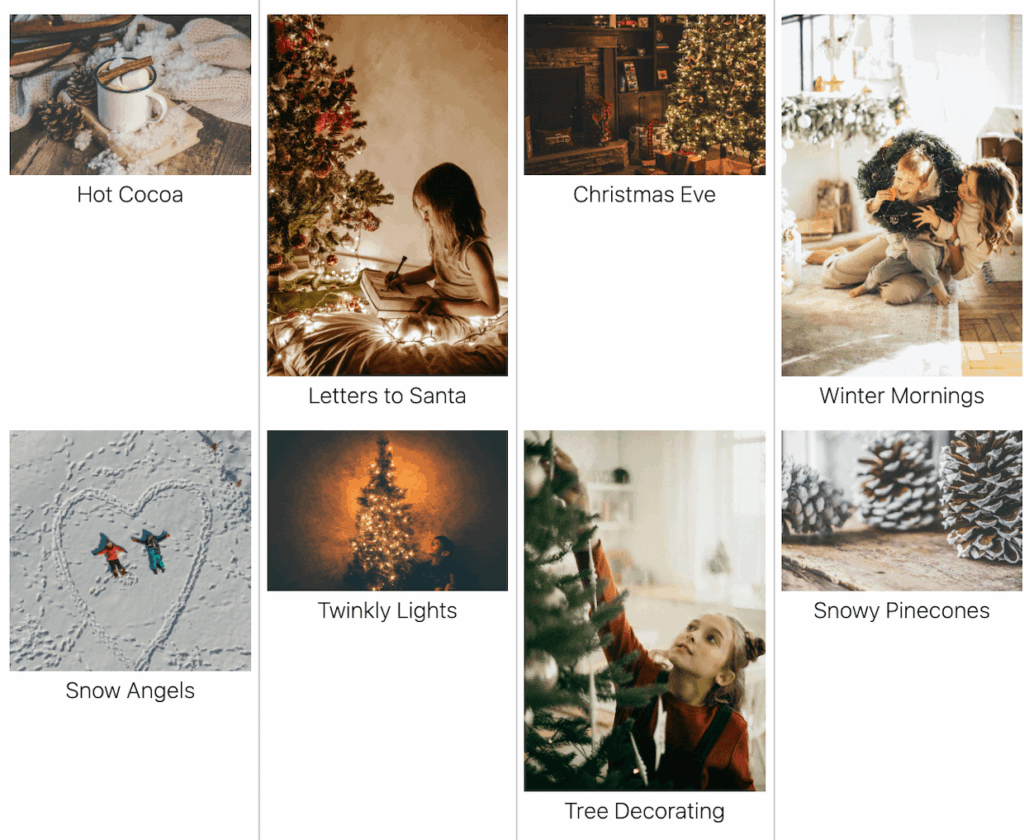
You’ll notice titles and captions display beautifully below each image in this layout. The vertical arrangement means these text elements feel like a natural part of the presentation.
This layout shines when you’re working with:
- Portrait-oriented photography that deserves to be seen at full height
- Galleries where each image title or caption adds important context
- Creative portfolios that benefit from a more unique presentation style
- Collections where the varying heights of images create visual rhythm
Start Using the New Layouts Today
Both layouts are available now for all Envira Basic and above users. Just update your plugin to the latest version, and you’ll see Grid Fixed Title and Vertical Line Grid as options in your gallery configuration tab.
To switch to either layout, open any gallery and head to the Configuration tab. Select your preferred option and save your changes. That’s it! These layouts work with all your existing Envira Gallery features, so you can still adjust columns, add watermarks, enable social sharing, or use any other addon you’ve already set up.
We’re always working to give you more ways to showcase your work exactly how you envision it. These two layouts expand your creative options without adding complexity to your workflow.
Have a suggestion for how to make Envira Gallery even better? Let us know with a feature request!
Don’t have Envira Pro yet? Upgrade today to unlock these layouts and dozens of other powerful features!
If you have any questions or need assistance, our customer support team is ready to help. Feel free to contact us directly or drop a comment below.
Stay tuned for more updates, and don’t forget to check out our blog and follow us on X (Twitter) for the best photography tips, resources, and WordPress tutorials.










