



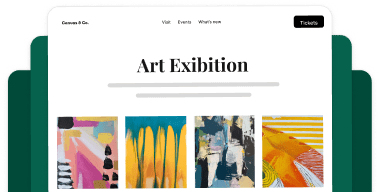


A well-designed fundraising campaign page can be the difference between a visitor who donates and one who clicks away. Most campaigns focus on the message, including the mission statement, the goal, and the ask. But there’s one element that consistently gets overlooked: visual proof.
Photos do something that words simply can’t. They put donors inside the story. And when people can actually see the faces, places, and moments behind a cause, they’re far more likely to give.
That’s why we’re excited to share that Envira Gallery now integrates directly with Charitable, one of the most popular WordPress fundraising plugins available. You can embed a stunning, fully interactive image gallery right inside your donation campaign..
Here’s everything you need to know.
Why Add an Image Gallery to Your Fundraising Campaign?
Most campaign pages rely on a single featured photo. It works, but it’s limiting. A gallery tells a fuller story. And in fundraising, a fuller story tends to convert better.
Here’s why it matters:
- It builds trust immediately. Donors are discerning. A gallery of real, high-quality photos from your work signals that your organization is active, credible, and worth supporting. It’s the difference between being told something and being shown it.
- It keeps people on the page longer. The more time someone spends engaging with your campaign, the more connected they feel to the cause. A gallery naturally encourages visitors to slow down, click through images, and absorb your story at their own pace.
- It gives recurring donors something new to see. If supporters come back to check on campaign progress, fresh photos are a reason to stay, and to give again. A living gallery that you update as your campaign evolves is much more compelling than a static page.
- It works especially well for certain campaign types. Animal rescues, youth programs, disaster relief, community development projects. Any cause with visual impact benefits enormously from showing that work up close.
How to Add an Image Gallery to Your WordPress Fundraising Campaign
For this tutorial, we’ll be using two plugins: Envira Gallery and Charitable.
Envira Gallery is the fastest, most reliable WordPress gallery plugin available.
Galleries load quickly, look great on any device, and come with a wide range of layouts, including grid, masonry, justified, mosaic, and more.

Both Envira Gallery Lite (free) and Envira Gallery Pro work for this, so you can get started without spending anything extra.
Charitable is a powerful WordPress donation plugin trusted by thousands of nonprofits and fundraisers.
It lets you build beautiful campaign pages, accept donations, manage donors, and track fundraising goals — all from your WordPress dashboard.
The Envira Gallery integration is available in Charitable Pro.
Looking to create a gallery for your nonprofit?
Envira Gallery offers special discounted pricing for nonprofit organizations.
Step 1: Create Your Gallery in Envira Gallery
Once Envira Gallery is installed and active, go to Envira Gallery » Add New Gallery and create a new gallery.
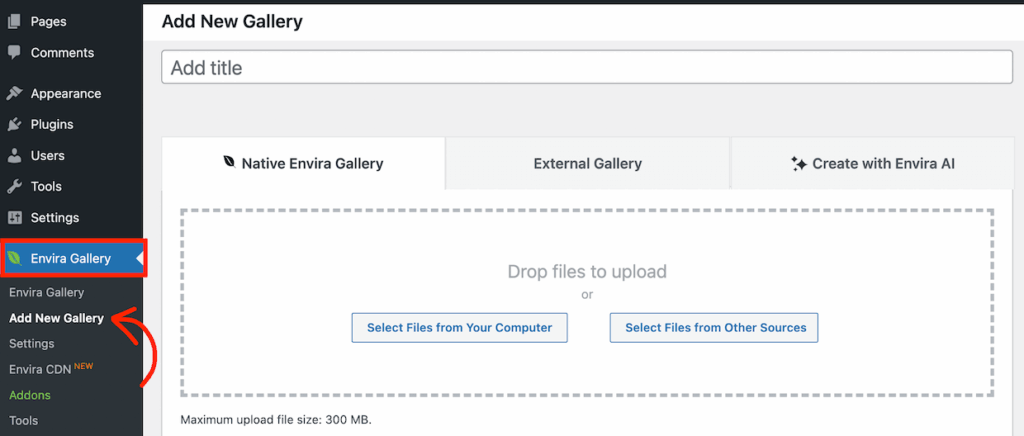
Upload the photos that best represent your campaign. This could be behind-the-scenes moments, events, the people your cause serves, or before-and-after shots of a project.
Choose a layout that fits your story, then save your gallery.
Step 2: Add the Envira Gallery Block to Your Campaign
Next, open your Charitable campaign (or create a new one).
Inside the campaign builder, look for the Envira Gallery block in the Pro section of the left-hand panel.
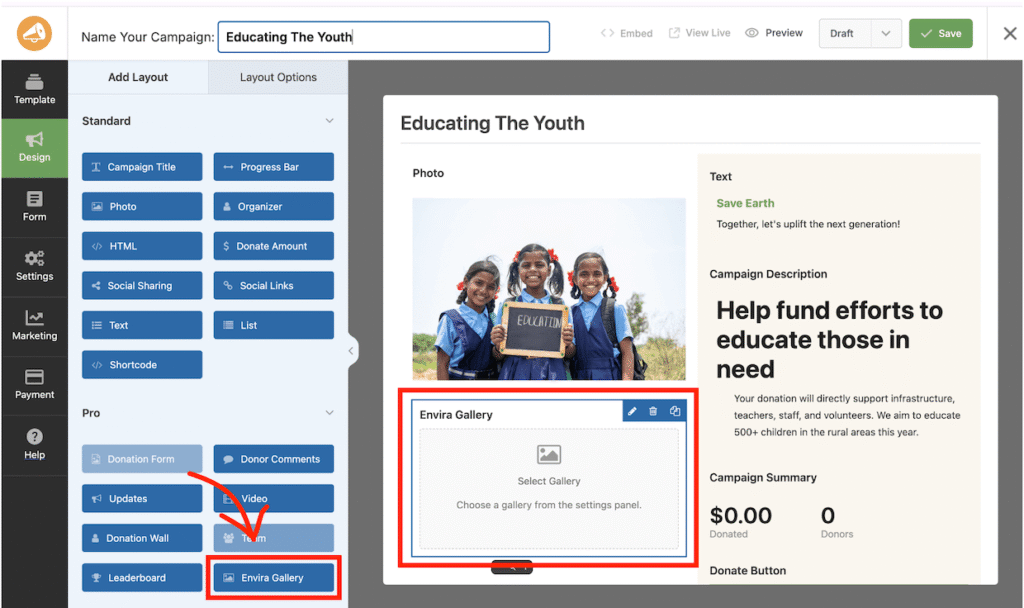
Drag and drop it into the campaign wherever you’d like the gallery to appear.
Step 3: Select Your Gallery
Once the block is placed, click on it to open the Layout Options panel. You’ll see a Gallery dropdown listing all the Envira Galleries on your site.
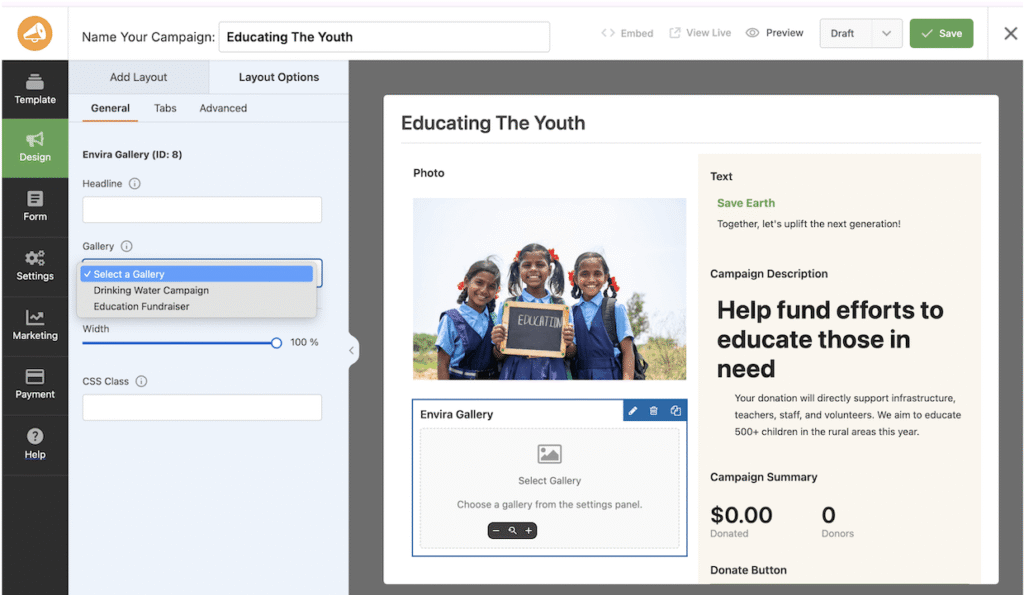
Select the one you want to display.
Step 4: Customize and Preview
After selecting a gallery, a live preview will appear directly in the campaign builder. From here you can also:
- Add a Headline above the gallery (something like “See Our Work in Action” or “Your Donations at Work”)
- Adjust the Width — 100% fills the campaign section nicely for most layouts
- Add a CSS Class for any custom styling tweaks
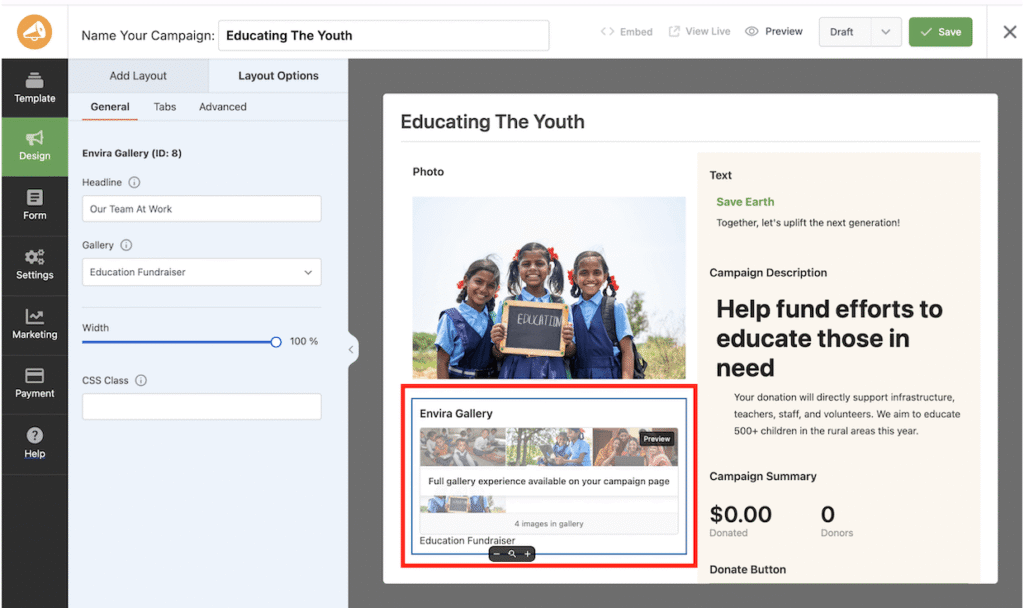
Hit Save, and your gallery is live on the campaign page. That’s it.
Tips for Getting the Most Out of Your Campaign Gallery
Adding a gallery is the easy part. Here are a few ways to make sure it actually moves people to donate.
Lead with your strongest image. The first photo in the gallery is the one most people will see. Make it count — choose something emotionally compelling, high resolution, and specific to the cause.
Keep it curated, not exhaustive. More photos isn’t always better. A focused gallery of 10–20 images tends to tell a cleaner, more powerful story than 80 loosely related shots. Think quality over quantity.
Show people, not just things. Photos of people, especially the individuals your organization directly helps, consistently outperform photos of objects, buildings, or abstract concepts. Faces create connection.
Write captions. Envira Gallery supports captions on every image, and they’re worth using. A brief line of context under a photo (“Students in our after-school program, January 2025”) adds credibility and keeps the story grounded.
Update the gallery as the campaign progresses. One of the advantages of embedding an Envira Gallery is that any changes you make to the gallery automatically reflect in the campaign. Use this to your advantage. You can add new photos as the campaign hits milestones to give return visitors a reason to engage again.
Match your gallery layout to your campaign tone. A masonry or justified layout feels editorial and dynamic, which works well for storytelling-heavy campaigns. A clean grid layout feels more structured and professional, which suits campaigns with lots of project documentation or detailed work.
FAQs About Image Galleries in WordPress Fundraising Campaigns
How many photos should I include in my fundraising campaign gallery?
There’s no magic number, but somewhere between 10 and 20 tends to hit the sweet spot for most campaigns. Enough to tell a complete visual story, but not so many that the gallery feels overwhelming or unfocused. If you have a large archive to pull from, be selective — prioritize photos that show people, action, and specific moments over generic scenery or group shots from a distance.
Will an image gallery slow down my fundraising campaign page?
Not with Envira Gallery. Performance is one of the things Envira Gallery is specifically built for. Images are lazy-loaded, meaning they only load as visitors scroll to them, which keeps your initial page load time fast. This matters for both user experience and conversion rates — slow pages lose donors before they ever see your story.
Do I need Envira Gallery Pro for this, or will the free version work?
You’ll need Charitable Pro on the fundraising side to access the Envira Gallery block in the campaign builder, but your gallery itself can be built using either Lite or Pro. If you want access to Envira’s more advanced layouts, lightbox options, and features like watermarking or social sharing, upgrading to Pro is worth it.
What types of photos work best for a donation campaign gallery?
Photos of real people connected to your cause consistently outperform generic or abstract imagery. Faces, especially people making eye contact with the camera, create an immediate sense of connection. Action shots of your team doing the work, before-and-after photos of a project, and candid moments from events all tend to perform well. Avoid heavy use of stock photography; donors can spot it, and it undermines the authenticity that makes a campaign compelling.
Ready to add stunning images to your fundraising campaigns? Get started with Envira Gallery today!
I hope you found this article helpful. Here are a few more resources you might find helpful:
- The Top Free Alternatives to Photoshop (Tested & Reviewed)
- How to Optimize Images for Web: Ultimate WordPress Guide
- How to Create a Slideshow in WordPress (The Easy Way)
Don’t forget to check out our blog and follow us on X (Twitter) for the best photography tips, resources, and WordPress tutorials.










