






Picking the best WordPress page builder looks like a design choice. For a photography or portfolio site, it also decides how your galleries get onto the page.
Some builders give you a gallery widget you can drag straight in. Others leave you pasting a snippet into a text box and hoping the preview shows something.
You usually find out which kind you picked late, once the layout is built and your best work is sitting in an empty box.
This list covers 7 of the best WordPress page builders for designing your pages, with prices, free versions, and an honest look at galleries in each. Six of them work with galleries from Envira Gallery, the WordPress gallery plugin, and I’ll show you exactly how.
What to Look for in the Best WordPress Page Builder for a Visual Site
A WordPress page builder lets you design a page by dragging in sections, columns, text, and images, so you can see the result as you build it without touching any code.
Most of them handle text and buttons well, but they differ in the details that matter once your site is full of photos. These are the five things I’d check before you commit to one:
- A real gallery option: Some builders include a gallery element in their free version. Others keep it for paid plans, or leave it out completely.
- A free version or trial: Building one test page tells you more about a builder than any feature list.
- What you’ll pay over time: Check whether the price is yearly or one-time, and how many sites it covers.
- Plugin or theme: Most builders are plugins that work alongside your theme. A few replace your theme entirely.
- How hard it is to leave: Pages built in one builder rarely move cleanly to another, so switching later usually means rebuilding.
That last point is the reason it pays to choose carefully now, before you’ve built twenty pages.
How Galleries Work in a WordPress Page Builder
A builder’s own gallery element is fine for a handful of photos on one page. When galleries are the heart of your site, it helps to keep them in a dedicated gallery plugin instead.
That way you build each gallery once and place it anywhere. Update the gallery, and every page that shows it updates too.
I’ll use Envira Gallery as the example throughout this list. Depending on the builder, your galleries get onto the page in one of three ways:
- A native widget or module: Elementor and Beaver Builder get a dedicated Envira element where you pick a gallery from a dropdown. This comes with Envira Pro plans and above.
- The Envira Gallery block: In the WordPress block editor, which Spectra builds on, you add the block and choose your gallery. It’s free in Envira Gallery Lite.
- The shortcode: Any builder with a shortcode, text, or code element can show an Envira gallery. This is free in Envira Gallery Lite too.
If you haven’t used one before, a shortcode is a short tag in square brackets, like . WordPress swaps it for your real gallery when someone views the page.
You’ll find each gallery’s shortcode in the Shortcode column under Envira Gallery » Galleries. Copy it, then paste it into your builder’s shortcode or text element.

The shortcode always shows the gallery exactly as you set it up in Envira. If you want a different layout or number of columns, you change that in the gallery itself, not in the shortcode.
Envira Gallery Lite uses the Automatic layout, and paid plans from Basic up unlock all 16 Gallery Templates. Our guide to adding Envira galleries with WordPress shortcodes covers the shortcode in more depth.
7 Best WordPress Page Builders (and How Each Handles Galleries)
I’ve ordered these from the tightest gallery integration to the loosest, so the builders where galleries feel most at home come first.
1. Elementor: Best All-Round WordPress Page Builder

Elementor is a drag-and-drop page builder where you design right on the page and see every change as you make it. The free plugin has over 10 million active installs on WordPress.org.
The free version includes Basic Gallery and Image Carousel widgets. The more flexible Gallery widget, with more layout options, is part of Elementor Pro, which starts from $60/year.
| BEST FOR: Site owners who want full visual control and a gallery widget built for Envira |
| PRICING: Free; Elementor Pro from $60/year (renews at the regular rate) |
| FREE PLAN / TRIAL: Yes, the free Elementor plugin |
| ENVIRA GALLERIES: Native Envira widget (Envira Pro plans and above) |
Elementor is where Envira fits in most naturally. With an Envira Pro plan or above, you get an Envira Gallery widget in its own Envira Gallery category. Drag it onto the page, pick a gallery from the dropdown, and a preview appears in the editor.
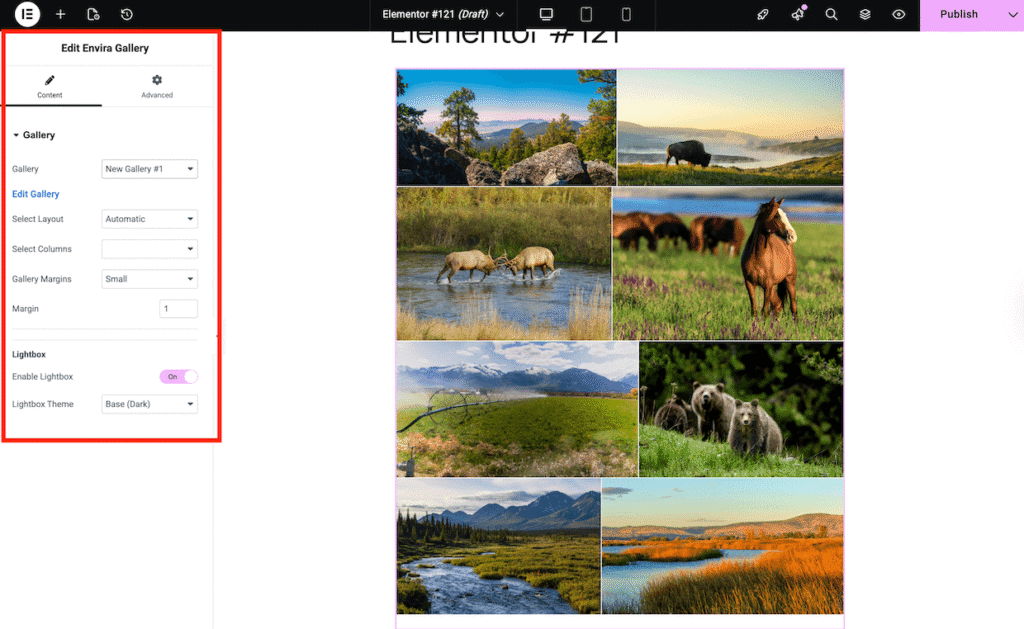
From the widget panel, you can change the layout, columns, and lightbox theme for that one spot. That means the same gallery can look different on two pages while its original settings stay untouched.
The widget doesn’t place Albums or Dynamic Galleries. Its editor preview is also a close guide rather than an exact match, so I’d check the live page before you publish.
If Elementor is your pick, our guide to building a photography website with Elementor takes you from blank page to finished portfolio.
2. SeedProd: Best WordPress Page Builder for Building a Full Site Fast With AI

SeedProd is a drag-and-drop WordPress website builder trusted by over 1,000,000 professionals. Its AI can build a complete site for you, with pages, copy, and images already in place, and you can try it on 3 websites for free without a credit card.
From there, you fine-tune every page with 90+ blocks and ready-made templates. From the Plus plan up, the Theme Builder lets you design your headers, footers, posts, and archives too, so the whole site matches. Regular prices start at $79 for one site, introductory pricing is also offered, and the free SeedProd Lite (600,000+ active installs) covers coming soon and maintenance pages.
| BEST FOR: Getting a complete site built fast with AI, then customizing it page by page |
| PRICING: Basic $79 (1 site), Plus $199 (3 sites), Pro $399 (5 sites), Elite $599 (100 sites), regular prices |
| FREE PLAN / TRIAL: Yes, SeedProd Lite, plus 3 free AI-built sites (no credit card) |
| ENVIRA GALLERIES: Shortcode block (paid SeedProd plans) |
For photos, SeedProd’s paid plans come with their own Gallery, Advanced Gallery, and Image Carousel blocks, plus a Shortcode block. SeedProd Lite includes the Image block.
That Shortcode block is how Envira fits in, so you’ll need a paid SeedProd plan for it. Drop it into your layout and paste your gallery’s shortcode, and your Envira gallery appears with all the settings you gave it.
If what you really need is a page built to convert, like a sales or sign-up page, our list of the best WordPress landing page plugins covers that job separately.
3. Beaver Builder: Best WordPress Page Builder for Client Sites

Beaver Builder is a front-end drag-and-drop builder with plans that scale from one site up to unlimited sites. That makes it a natural fit if you build sites for clients.
Paid plans start at $89/year for one site, and every plan includes the Beaver Builder Theme and Beaver Themer. The free Beaver Builder Lite has 100,000+ active installs.
| BEST FOR: Freelancers and agencies building galleries into client sites |
| PRICING: Starter $89/year (1 site), Plus $179 (3 sites), Professional $299 (50 sites), Unlimited $546 |
| FREE PLAN / TRIAL: Yes, Beaver Builder Lite |
| ENVIRA GALLERIES: Native Envira module (Envira Pro plans and above) |
Lite has a Photo module for single images, but no Gallery module of its own. It does accept widgets and shortcodes, so the Envira shortcode is an option there.
With Envira Pro or above, you get an Envira Gallery module in its own Envira Gallery Modules category. Its settings let you select a gallery, then choose the layout, columns, margins, and lightbox theme.
Choosing No lightbox in the theme dropdown turns the lightbox off. One difference from Elementor: the module saves these choices to the gallery itself, so other pages showing the same gallery pick up the change too.
As with Elementor, the module doesn’t place Albums or Dynamic Galleries. Our walkthrough on adding image galleries with the Beaver Builder addon shows the module in action.
Both of these builders give your galleries a proper home inside the editor, and that’s the main reason they sit at the top of this list.
Pick Your Galleries Right Inside Your Builder
Envira Pro plans and above add a gallery widget to Elementor and a module to Beaver Builder. Choose a gallery from a dropdown and change its layout without leaving the editor.
4. Block Editor + Spectra: Best Free WordPress Page Builder Setup

You might not need a separate builder at all. The WordPress block editor comes free with every site, and it already lets you lay out pages with columns, images, and groups of blocks.
Spectra, from Brainstorm Force, adds more blocks to that same editor. The original plugin, now called Spectra Legacy, has over 1 million active installs, and new sites get the rebuilt Spectra Blocks. Spectra Pro costs $69/year or $319 lifetime.
Because you stay inside the editor WordPress already gives you, there’s no new interface to learn and no extra builder to keep paying for.
| BEST FOR: Anyone who wants great-looking gallery pages at no cost |
| PRICING: Block editor free; Spectra free; Spectra Pro $69/year or $319 lifetime |
| FREE PLAN / TRIAL: Yes, both are free to start |
| ENVIRA GALLERIES: Envira Gallery block (free in Envira Gallery Lite) |
This is also the strongest pairing if you don’t want to spend anything. The Envira Gallery block is native to the editor and free in Envira Gallery Lite.
Add the Envira Gallery block, and it asks you to select a gallery to add to your page. Pick one from the dropdown and you’re done.
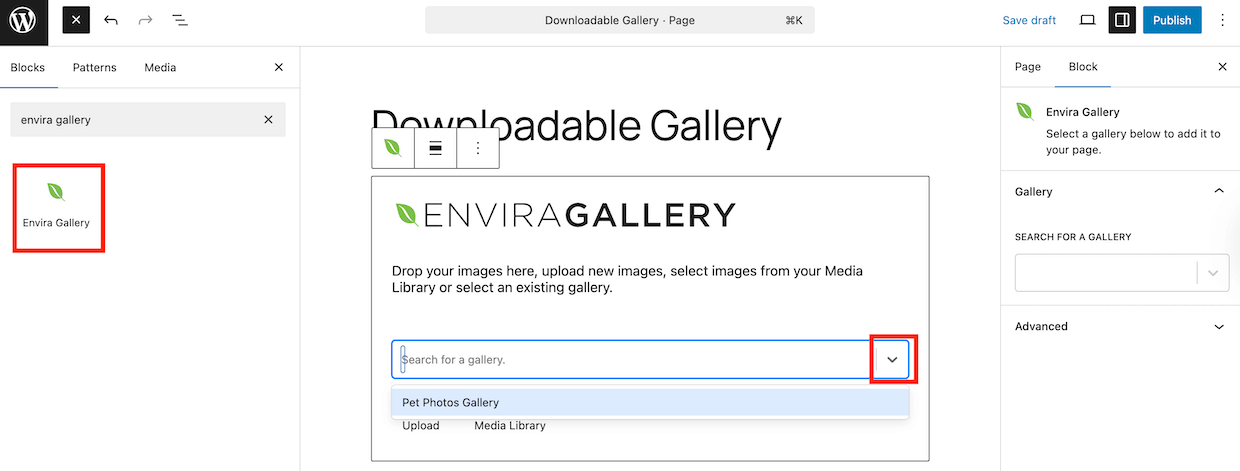
The block also supports wide and full-width alignment, so a portfolio gallery can stretch edge to edge when your theme allows it.
5. Divi: Best WordPress Page Builder for Unlimited Sites

Divi is a visual builder from Elegant Themes, and Divi 5 is now available. One license covers unlimited sites, so the price stays the same whether you run two sites or twenty.
It costs $89/year or $249 lifetime, with Divi Pro at $277/year. There’s no free version, but you get a 30-day refund window to try it.
| BEST FOR: Photographers and designers running several sites on one license |
| PRICING: $89/year or $249 lifetime (unlimited sites); Divi Pro $277/year |
| FREE PLAN / TRIAL: No free version; 30-day refund |
| ENVIRA GALLERIES: Shortcode in a Text or Code module (free) |
Divi 5’s own Gallery module shows images as a Grid or a Slider. You can set the columns, add pagination, and toggle titles and captions on or off.
There’s no Envira module for Divi, so you’d use the shortcode. Add a Text or Code module, then paste your gallery’s shortcode inside it. This works in both Divi 4 and Divi 5.
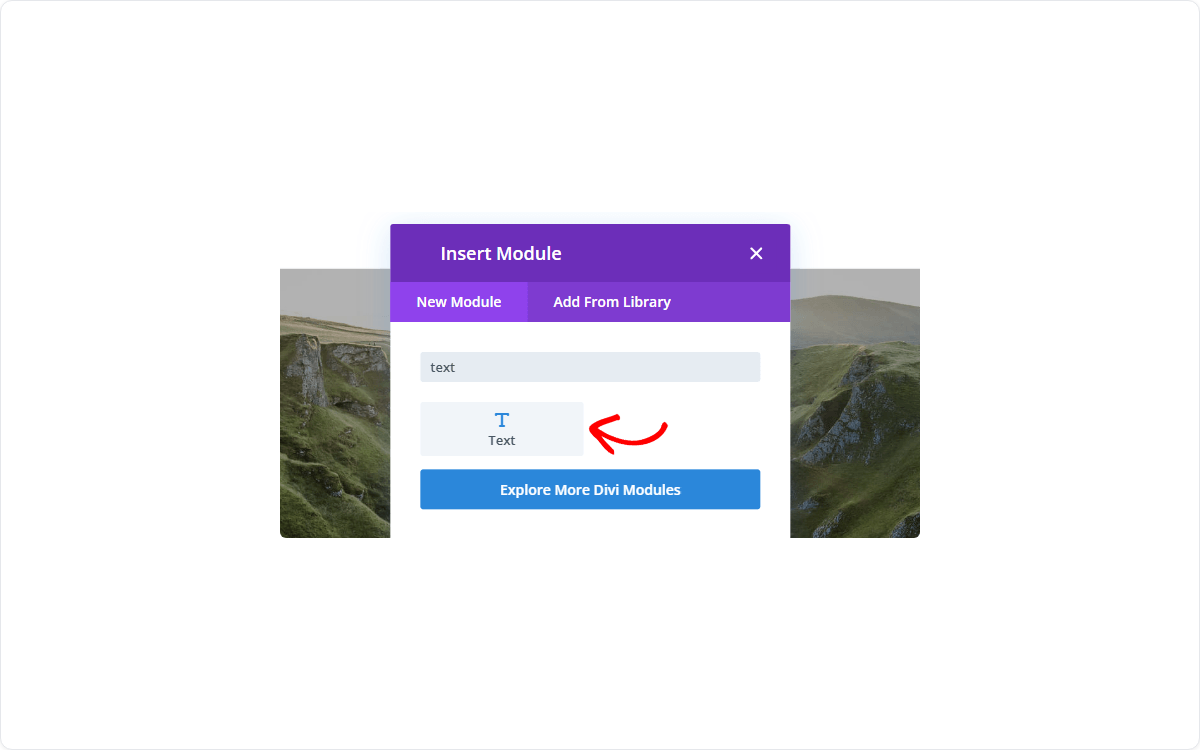
If the gallery looks blank in Divi’s Backend Builder, don’t worry. It shows up properly in the Visual Builder and on the live page.
6. Bricks: Best WordPress Page Builder for Built-In Gallery Layouts

Bricks works differently from the rest of this list: it’s a theme, not a plugin. Installing it replaces your current theme, so it suits a new site better than an existing one.
Its Image Gallery element handles grid, masonry, and metro layouts, with a lightbox included. So you get several gallery layouts without installing anything extra.
| BEST FOR: New sites where you’re happy to switch themes |
| PRICING: Starter $79/year (1 site), Business $149 (3 sites), Agency $249 (unlimited), Ultimate Lifetime $599 |
| FREE PLAN / TRIAL: No free download; online playground to try it |
| ENVIRA GALLERIES: Shortcode element (free) |
Plans start at $79/year for one site. There’s no free download, but you can test it in the online playground before you buy.
For Envira galleries, Bricks has a Shortcode element. Add it to your page and paste in the gallery’s shortcode.
7. Breakdance: Best Free WordPress Page Builder for Unlimited Sites

Breakdance has a free plan you can use on unlimited sites, with 80 elements to build with. Breakdance Pro costs $99.99/year for one site or $199.99/year for unlimited sites.
| BEST FOR: Trying a full visual builder without paying upfront |
| PRICING: Free; Pro $99.99/year (1 site) or $199.99/year (unlimited sites) |
| FREE PLAN / TRIAL: Yes, free on unlimited sites |
| ENVIRA GALLERIES: Not confirmed yet |
Breakdance also has its own Gallery element, so you can put a simple photo grid on a page without adding anything else.
To be upfront, I haven’t confirmed that Envira galleries work in Breakdance, so I can’t recommend it as an Envira pairing yet.
The free plan makes it easy to test on a spare site with one of your galleries before you build anything real.
Which WordPress Page Builder Is Best for Your Gallery Site?
Here’s how the 7 builders compare side by side, including the route your Envira galleries take in each one:
| Builder | Free version | Paid plans from | Envira galleries |
|---|---|---|---|
| Elementor | Yes | $60/year (Pro) | Native widget (Envira Pro+) |
| SeedProd | Yes (Lite) | $79 (Basic) | Shortcode block (paid SeedProd) |
| Beaver Builder | Yes (Lite) | $89/year | Native module (Envira Pro+) |
| Block editor + Spectra | Yes | $69/year (Spectra Pro) | Envira Gallery block (free) |
| Divi | No (30-day refund) | $89/year | Shortcode (free) |
| Bricks | No (online playground) | $79/year | Shortcode element (free) |
| Breakdance | Yes | $99.99/year (Pro) | Not confirmed |
If you want to pick, preview, and restyle galleries without leaving the builder, I’d go with Elementor or Beaver Builder plus Envira Pro. They’re the only two where Envira adds its own widget or module.
If you’d rather not spend anything, the block editor with the free Envira Gallery block is hard to beat. Pair it with one of the best WordPress photography themes, and add Spectra later if you want extra design blocks.
Running several sites? Divi’s unlimited-site license makes sense, and the shortcode gets your galleries in with no extra cost.
Already on Bricks or a paid SeedProd plan? There’s no need to switch, because their shortcode elements show your Envira galleries just fine.
Whichever route fits, your galleries live in Envira, so you can keep improving them without rebuilding a single page.
Build Your Galleries Once, Keep Them When You Switch
Your galleries live in Envira, so switching builders never means rebuilding them. The block and shortcode are free, and Envira Pro plans and above add the Elementor widget and Beaver Builder module.
Still torn between two? Build one test page in each with a real gallery on it, and you’ll quickly see which one you’d rather use every day.
FAQs About WordPress Page Builders
What is the best WordPress page builder for beginners?
For most beginners, I’d start with the WordPress block editor because it’s already on your site and costs nothing. If you want more design freedom, Elementor is a friendly next step, and its free version lets you learn before you pay.
Is there a free WordPress page builder?
Yes. The block editor is built into WordPress, and Elementor, Beaver Builder Lite, SeedProd Lite, Spectra, and Breakdance all have free versions. Divi and Bricks don’t, although Divi has a 30-day refund and Bricks has an online playground.
Is the WordPress block editor a page builder?
In practice, yes. It lets you build layouts from blocks like columns, images, and buttons without code. Plugins like Spectra add more blocks to it, so it can grow with your site.
Do I need a page builder to add a gallery in WordPress?
No. With Envira Gallery Lite, you can add a gallery to any page using the free Envira Gallery block in the block editor. A page builder only matters if you want to design the rest of the page around it.
Which page builders work with Envira Gallery?
Elementor and Beaver Builder get a native Envira element with Envira Pro plans and above. The block editor uses the free Envira Gallery block. Divi, Bricks, and paid SeedProd plans show Envira galleries through the free shortcode.
Can I switch WordPress page builders later?
You can, but pages built in one builder usually need rebuilding in the new one. Keeping your galleries in a gallery plugin helps here, because the galleries themselves don’t change. You just place them again in the new builder.
The best WordPress page builder is the one that lets your work shine without fighting you on every page. Once you’ve chosen yours, be sure to check out our post on how to make a WordPress photography website.
Not using Envira Gallery yet? Get started today!
Don’t forget to follow us on Facebook and X (Twitter) for the best photography tips, resources, and WordPress tutorials.